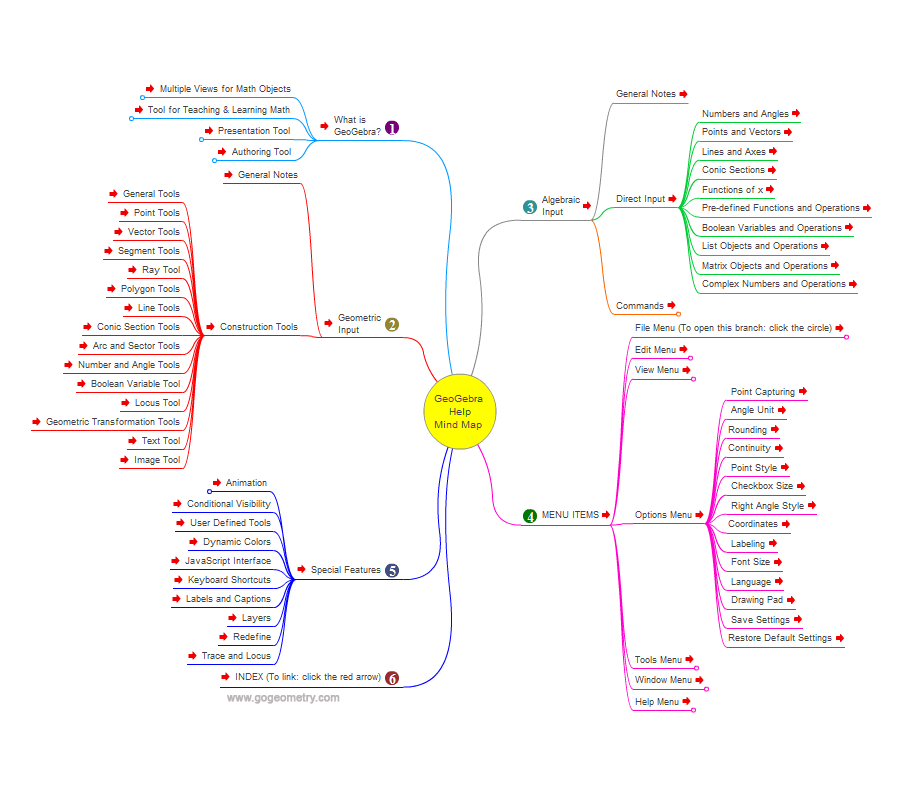
Mind Map Description
Interactive Mind Map based on
Online: GeoGebra 4.2 Help Document.
GeoGebra
GeoGebra is an interactive geometry software for education in schools. Most parts of GeoGebra are free software. GeoGebra is written in Java and thus available for multiple platforms.
Its creator, Markus Hohenwarter, started the project in 2001 at the University of Salzburg, continuing it at Florida Atlantic University (2006–2008), Florida State University (2008–2009), and now at the University of Linz together with the help of open-source developers and translators all over the world.
Source: Wikipedia, GeoGebra.
GeoGebra is dynamic geometry software. Constructions can be made with points, vectors, segments, lines, polygons, conic sections, and functions. All of them can be changed dynamically afterwards.
Elements can be entered and modified directly on screen, or through the Input Bar. GeoGebra has the ability to use variables for numbers, vectors and points, find derivatives and integrals of functions and has a full complement of commands like Root or Extremum. Teachers can use GeoGebra to make conjectures and prove geometric theorems.
Graphic organizers
Graphic organizers are visual
representations of knowledge, concepts or ideas.